- Published on
Do You Need a New Phone Every Year to Test Your App?
This week I got the email from Google: the Pixel 11 series is official. I hopped online right away, started reading, and asked myself the same question I ask every year — do I want this phone? And I'll be honest, I'm conflicted.
Something you should know about me: I try to buy a new phone almost every year. Not always the same platform — a couple of years ago it was the iPhone 16 Pro, and my Android daily driver is still a Galaxy S24+ I've had since it came out. I also run an iPhone and an Android phone at the same time, on purpose. They serve different roles, and I tell business owners in the mobile space they should be paying attention to both, because the more you see of how your app behaves on each platform, the better you understand the issues your users actually run into.
But here's the thing I want to get at, because it's the question buried under my yearly phone debate: should your business be buying new devices every year to test your app on?
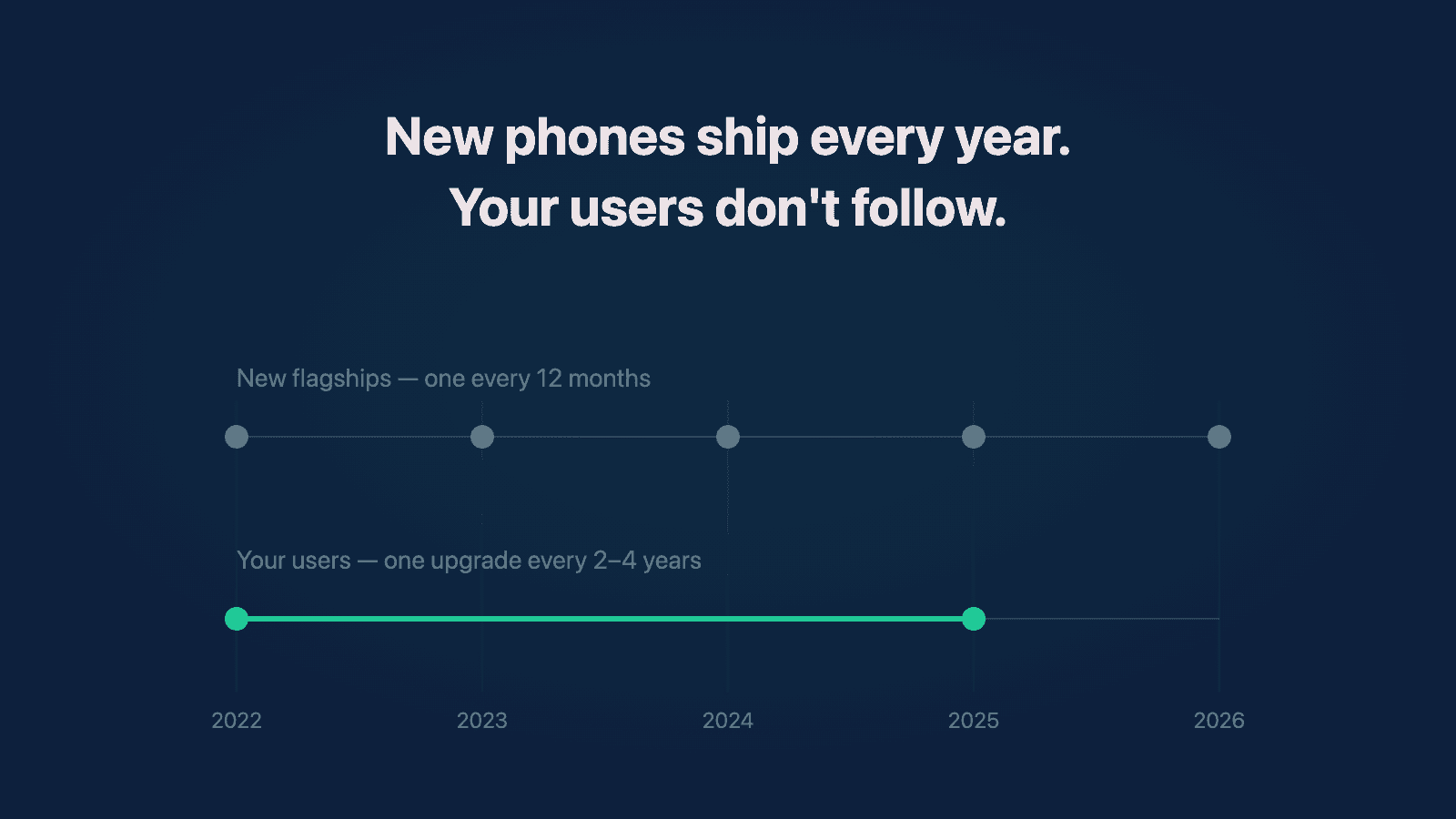
The short answer is no. Most people keep their phones for two to four years, so the newest hardware is exactly where your users aren't. For most businesses, replacing test devices every three to four years is plenty. What matters far more is the operating system: make sure your app works well on the current OS version and the two before it, and put someone on the developer betas every summer so the next version never surprises you. That's the whole playbook. The rest of this post is why.
Why I buy a new phone almost every year
For me it's partly FOMO, I'll admit that. But mostly it's about being proactive. New hardware sometimes ships with capabilities that older devices never get, and I want to be playing with those the day they exist, not a year later. It also keeps me honest about where these platforms are actually going, because I'm holding the changes in my hand instead of reading about them.
Here's an example of how that pays off in a small way. When the iPhone 16 Pro came out, Apple added the Camera Control button on the side. I remember thinking: that's cool, but it's not a feature I'm dying for. I bought the phone anyway, and to this day I use that button way more than I thought I would. That's the kind of thing you only learn by living with a device.
But notice what that is: it's a developer's curiosity, and a nice-to-have. It's not a business requirement. And I think a lot of app owners quietly feel like they're falling behind if they're not testing on the latest device every year. You're not.
How often do people actually replace their phones?
This is the number that should drive your decision, and the research backs up what I suspected: most people hold onto their phones for years. Surveys put the largest group of users on a two-to-three-year upgrade cycle, with only around 14% upgrading every year, and the average replacement cycle in the US has stretched to somewhere between two and a half and nearly four years depending on whose estimate you use.
So if you buy this year's flagship to test your app, you're testing on a device that most of your users won't touch for two or three years — and some never will. A four- or five-year-old phone will run most apps just fine, and for most applications the year-over-year hardware jump doesn't change how your app behaves at all. Two or three years, that's where you start to see a noticeable gap. And that's true on both Android and iOS.
There are exceptions, and they're worth naming. If a specific piece of hardware or a device-exclusive feature matters to your product — a camera capability your app depends on, a sensor, a new form factor like the foldables I wrote about last week — then buying that device early is a real advantage. Samsung is also known for shipping OS features on its newest devices first and letting older ones wait on One UI updates, so if your app leans on something like that, the wait matters. Those are reasons. "It's this year's phone" is not.
Focus on the operating system, not the device
Here's what actually determines whether your app works for your users: not which phone they hold, but which OS version it runs. And this is where I give every client the same rule of thumb — support the current version minus two.
Right now on Android, Android 17 went stable in June, so that means actively supporting 17, 16, and 15. On iOS, when iOS 27 ships in the next few weeks, that means 27, 26, and 18. Anything older than that: if the phone can run your app, let people download it and use it — you don't want to lose users over it — but in terms of bug fixes, testing time, and true support, draw the line there.
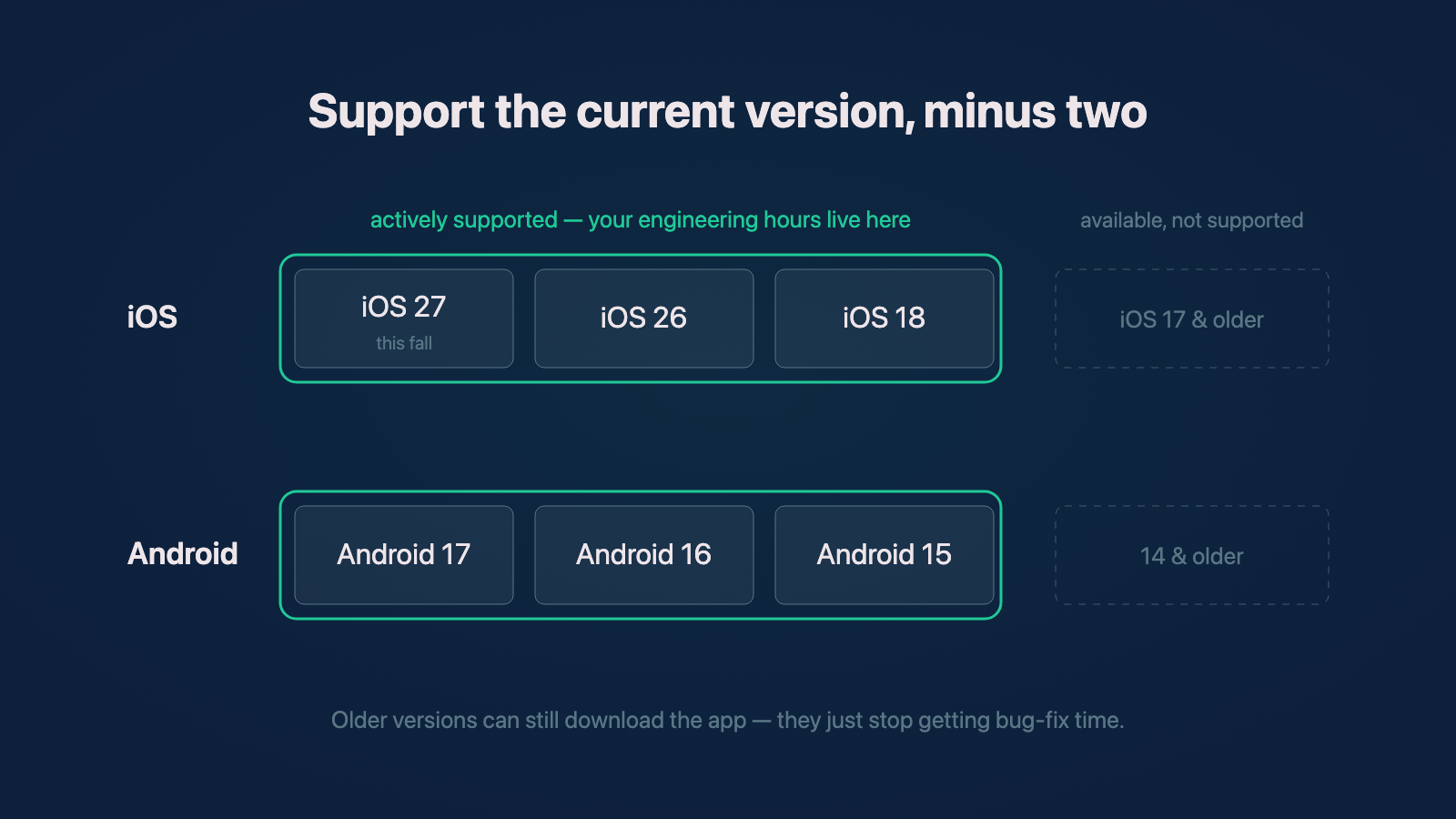
The current-minus-two rule as it stands this fall. Older versions still get to download the app; they just stop getting your engineering hours.
The two platforms make this rule play out very differently, and it's worth seeing the numbers side by side. On iOS, adoption concentrates fast: Apple's own numbers show 79% of all iPhones were running iOS 26 by June, and 86% of iPhones from the last four years. On Android, it's the opposite — the single most popular version, Android 16, covers only about 24% of devices, and the rest of the user base is spread across half a dozen older versions, especially on lower-tier phones.
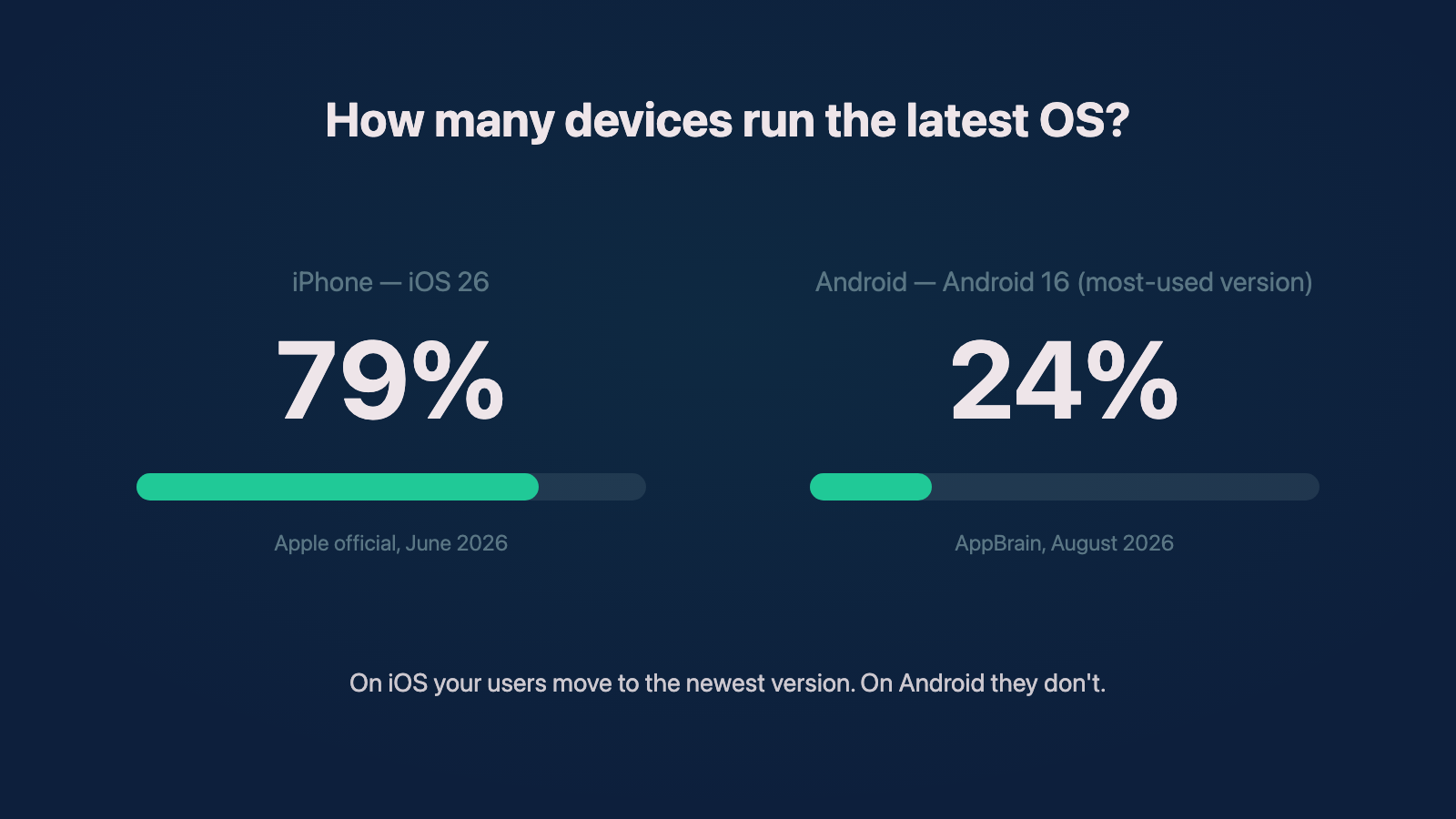
The same question, two very different answers. iOS adoption per Apple's official June 2026 numbers; Android 16 share per AppBrain, August 2026.
That fragmentation is exactly why the minus-two rule exists. You can't support every Android version well, and you don't need to. What you need to know is your own demographic: who your users actually are and what they're actually running. If a meaningful slice of your audience genuinely needs an older version, that's a conversation worth having. But spending real engineering time on a problem that affects one percent of your user base isn't a productive use of anyone's money. This is the kind of question a technical audit answers with data instead of guesses — your analytics already know which OS versions your users are on.
Put one developer on the betas
Here's the caveat I always throw in, and I think it's the highest-value habit on this list. Both platforms release developer betas months before the public release — Apple's run from June to September, and Google's start even earlier in the year. If you have the capability, at least one of your developers should be running each platform's beta as their daily driver every year, using your app on it the whole time.
Most years, they won't find much. But when issues do come up, it is so nice to find them months early. By the time the new OS ships to your actual users, your app just works, and you never have to explain to anyone why it broke on launch day. Keeping someone on the betas year-round is exactly the kind of ongoing attention an embedded team is for, and it's cheap insurance compared to a launch-week fire.
When the bleeding edge actually pays off
I said new hardware every year is a developer's luxury, and I want to be fair to the other side of that, because I've lived it.
Years ago I was working at General Motors on their EV maps platform, and GM ran a hackathon right after WWDC — the year Apple announced Lock Screen widgets and Live Activities. I built two ideas: a widget that unlocked your EV from the Lock Screen, and a Live Activity that let you check your car's climate temperature at a glance. This was brand-new API surface at the time; the tools had existed for a matter of weeks. Apps like Tesla's and Rivian's do versions of both of those things today, and it's genuinely cool to watch an idea I pitched at a hackathon show up as something drivers use every day.
The point isn't that I was early. The point is that none of that happens if developers don't get room to play with new tools the week they exist. So if you're a business owner, I wouldn't discount the flashy stuff entirely — giving your developers the chance to experiment with new hardware and new OS capabilities is how you occasionally find the feature that sets you apart. That's the one situation where I'd tell someone to just get the new device: when there's a concrete reason to believe it could positively impact your product, not just a fear of falling behind.
So am I buying the Pixel 11?
I watched the live demos, and you could see how hard they were working to hype it up. But I sat there thinking: this just isn't that different from last year's phone. The camera specs barely moved — the headline additions are things like HiLight, a glowing rear LED that's exclusive to the Pro models. And there's one detail that genuinely bugs me, which a lot of the coverage has picked up on: the base Pixel 11 Pro now comes with 12GB of RAM instead of the 16GB that was standard across last year's Pro line — you have to pay up to the higher storage tiers to get 16GB back. I know memory prices are up across the industry, but it feels like a reversion, like being asked to pay extra for what was standard.
So honestly, I don't know. I might keep the S24+ another year. If I find a Pixel 10 at a good discount, I might buy that instead, because it's just not that far off from this year's model — which kind of proves the whole point of this post. Samsung already impressed me this year with the Z Fold 8 line, and Apple is expected to announce its foldable in September, so my upgrade excitement is mostly pointed there now.
But that's me, and my yearly phone habit is a tool of my trade. For your business: buy test devices every three to four years, know which OS versions your users are actually on, support current minus two, and put somebody on the betas every summer. These are general thoughts and there are always exceptions, but I think this is more true than not.
Need help with your project?
Chris Martinez
Founder of CAM Software · Mobile engineer
Chris founded CAM Software in 2022. He leads embedded product engineering engagements for established companies with mobile-led products, inherited applications, and delivery challenges. His work spans product alignment, React Native and native mobile engineering, supporting web and backend systems, release reliability, and responsible AI delivery. He also operates software products owned and operated by CAM Software from Northwest Arkansas and works with teams nationwide.