- Published on
What Hardware Does a Mobile App Development Team Need?
A mobile developer who supports iOS should not have to prove why they need a Mac. I have had to do it more than once.
A company would hire me to work on its mobile app, ship a Windows laptop just before onboarding, and then ask why I wanted something different. From an HR or procurement perspective, the request probably sounded like a preference. From the development side, it was part of the release path. If iOS is in scope, the team needs access to Xcode, and Xcode runs on macOS.
Every company eventually corrected the mistake. The interesting part was that the mistake happened at all. It usually meant the organization was new to mobile or still treating the app like a smaller version of its web product.
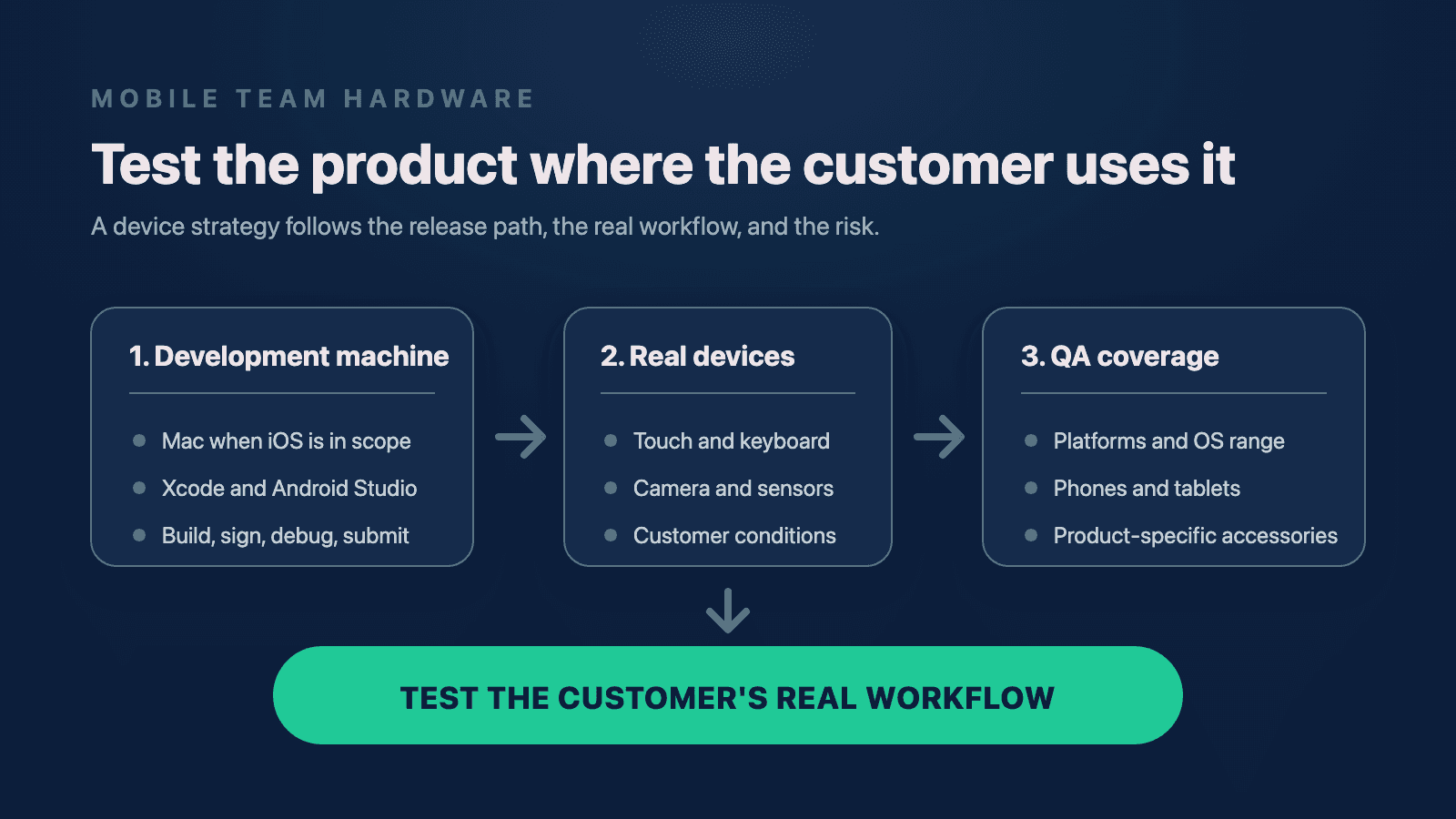
The computer matters, but it is only the first decision. A mobile team also needs real phones or tablets, a deliberate QA device pool, and any peripheral hardware that customers depend on. Otherwise the team is testing an approximation of the product instead of the product itself.
Start with the release path, not the laptop brand
If your product ships on iOS, provide a Mac that supports the Xcode version your release requires. That does not mean every developer needs the most expensive MacBook Pro or the newest desktop Apple announced. It means the machine has to support the actual work: compiling the app, running simulators, signing builds, debugging on devices, and following the same path the team will use to submit a release.
Android development is more flexible. Android Studio runs across the major desktop operating systems, and an Android-only team can make a reasonable case for Windows, macOS, or Linux based on its stack and company standards.
The decision changes when the same developer supports both platforms. A Mac can run the Apple and Android toolchains. A Windows machine cannot run Xcode locally. If your team builds React Native for iOS and Android, issuing a Mac is normally the cleanest way to avoid creating a separate iOS bottleneck.
That is the part procurement sometimes misses. React Native shares application code, but it does not remove the native release environments underneath it. The team still owns an iOS project and an Android project. It still has to compile, sign, debug, and submit both.
For leaders evaluating how the release path fits into the team's broader ownership, this is part of what embedded product engineering leadership should make visible. Hardware is not an employee perk when it determines whether the product can ship.
Simulators and emulators are coverage tools
I use simulators and emulators every day. They are fast, repeatable, and excellent for checking multiple screen sizes or operating-system versions without filling a room with devices. They are also not the hardware customers use.
Apple's own Xcode guidance makes the distinction clear: simulators are useful for debugging across device configurations, but they do not reproduce every feature or performance characteristic of a physical device. Google's Android guidance makes the same practical point from the other side. Use the emulator for broad coverage, then test the app on real hardware before release.
This matters most around the parts of a phone that are hard to approximate:
- cameras and microphones;
- push notifications and permission states;
- Bluetooth, location, and other sensors;
- background and foreground transitions;
- battery, memory, storage, and network constraints;
- touch input, rotation, and the software keyboard; and
- accessories connected to the phone or tablet.
I once worked on a camera feature where a computer's camera could be routed into an Android emulator. It was good enough to move the work forward. It was not good enough to prove how the feature behaved on the device where a customer would use it.
That is how I think about virtual devices in general. They help the team move quickly and widen coverage. They should not be asked to provide evidence they cannot provide.
The software keyboard is a small example with a large lesson
On another inherited app, the developers usually entered text with their computer keyboards while working in a simulator. The workflow looked fine on their desks.
On a physical phone, the software keyboard covered much of the screen. The user could not scroll far enough to see or reach part of the form while typing. Nobody had built the screen around the space the keyboard actually consumed because nobody had been testing the full interaction.
Once I connected a real device and reproduced the flow, the bug was easy to identify and patch. The difficult part was not the code. The difficult part was recognizing that the team's normal testing setup had made the problem invisible.
That is why real-device testing should not begin only when QA receives a build. Developers need a fast way to run the feature on hardware while they are building it. QA then validates a broader set of devices, operating systems, states, and customer workflows.
A defect that takes minutes to fix during development can become a support ticket, a regression cycle, and an avoidable release risk when the first person to see it is a customer.
Build the device pool around the product
The answer is not to buy every person four devices. An iPhone, iPad, Android phone, and Android tablet for every developer is expensive, hard to manage, and usually unnecessary.
Start with the product's primary customer surface.
If the app is phone-first, give the team real phones. If it is tablet-first, prioritize tablets. If both form factors carry important workflows, represent both. A phone app that merely stretches onto a tablet does not need the same device strategy as a field product whose employees spend every shift on an iPad or Android tablet.
For a team supporting iOS and Android, I normally want each developer to have reliable access to at least one company-approved physical device, with the other platform available through a shared pool or another deliberate arrangement. Some companies supplement that with an employee's personal phone. If they do, it should be governed by an explicit bring-your-own-device policy, not treated as an invisible condition of the job.
QA needs broader coverage than an individual developer because QA is responsible for the combinations. That pool may include:
- a current iPhone and a still-supported older iPhone;
- a representative Android device from the product's real customer base;
- a tablet on each important platform when tablet workflows matter;
- devices running the oldest operating-system versions the product supports; and
- a current device that can test the next platform changes before customers receive them.
This is also where usage data should change the budget. If support tickets or analytics show that a meaningful group of customers uses one Android manufacturer, an older device class, or a tablet workflow, the test pool should reflect that evidence. Do not build the lab around whichever phones happen to be easiest to buy.
If you want the larger launch-readiness checklist around device coverage, permissions, interruptions, and monitoring, I cover it in 8 Things First-Time App Creators Need to Get Right Before Launch.
Buy the accessories your customers use
The least obvious hardware is often the most important.
I have worked with products whose users attach keyboards to tablets. Other apps depend on portable printers, styluses, cameras, scanners, or specialized Bluetooth devices. If that accessory is part of a customer's normal workflow, it is part of the product surface.
A team cannot responsibly validate a signature flow without the stylus customers use, a printing flow without the printer, or a camera workflow only through a laptop webcam. The accessory does not need to sit on every desk. It does need to be available, documented, and included in repeatable tests.
A useful buying question is not, "What devices should a mobile team own?" It is, "What hardware has to work for our customer to finish the job?"
That answer usually produces a smaller and more useful list.
React Native and Expo still have native edges
Cross-platform tooling can simplify the application layer without eliminating the platform layer.
A React Native team still needs Xcode for iOS work and Android Studio for Android work. Expo can remove a great deal of early configuration friction, but Expo Go is intentionally a fixed playground. It contains a predetermined set of native libraries. When the app needs native code that is not already inside Expo Go, the team needs its own development build.
React Native Firebase is a straightforward example. Its native code is not bundled into Expo Go, so a team using it needs a development build. If the team creates that build locally, it needs the underlying native toolchains configured.
That does not make Expo Go a bad tool. It makes it the wrong acceptance test for a production app whose native requirements have outgrown the playground.
The same ownership rule applies across React Native first, Swift and SwiftUI second, and Kotlin and Jetpack Compose third: the framework may change how much code the team shares, but the product still has to work on the native platforms where customers receive it.
A practical starting setup
For a company staffing a mobile team, I would start with this:
- A release-capable development machine. Use a supported Mac when iOS is in scope. Choose Windows, macOS, or Linux for Android-only work based on the actual toolchain.
- The native tools. Keep Xcode and Android Studio installed and owned, even when the app uses React Native or Expo.
- Real-device access for developers. Make it fast enough that testing a feature on hardware is a normal development step.
- A broader shared pool for QA. Cover the platforms, supported operating-system range, form factors, and customer device patterns that create meaningful risk.
- Product-specific accessories. Include the keyboards, printers, styluses, cameras, scanners, or other devices required by real workflows.
- An owner and a replacement rule. Track the inventory, keep devices updated, and replace them when they can no longer represent a supported customer environment.
Buying the right hardware will not fix a weak process. A bad product is still a bad product when it runs on a physical phone.
What the hardware does is remove an excuse. It lets developers experience the flow before QA. It lets QA reproduce the customer's environment before support has to. It gives product leaders something real to evaluate instead of a demo that works only under ideal conditions.
The device cabinet is not the strategy. The strategy is making sure the people responsible for the product can use it the way the customer does.
Need help with your project?
Chris Martinez
Founder of CAM Software · Mobile engineer
Chris founded CAM Software in 2022. He leads embedded product engineering engagements for established companies with mobile-led products, inherited applications, and delivery challenges. His work spans product alignment, React Native and native mobile engineering, supporting web and backend systems, release reliability, and responsible AI delivery. He also operates software products owned and operated by CAM Software from Northwest Arkansas and works with teams nationwide.