- Published on
Which Phones Should You Test Your App On in 2027?
We're ending 2026 and about to hit 2027, and I get asked the same question every year around this time: which phones should we buy to test our app on? Sometimes it's a company buying devices for its developers. Sometimes it's someone shopping for family over the holidays and wondering what to get.
I use iOS and Android consistently, daily, and I always tailor these opinions to development. But a lot of what follows is still useful if you're just looking for a phone.
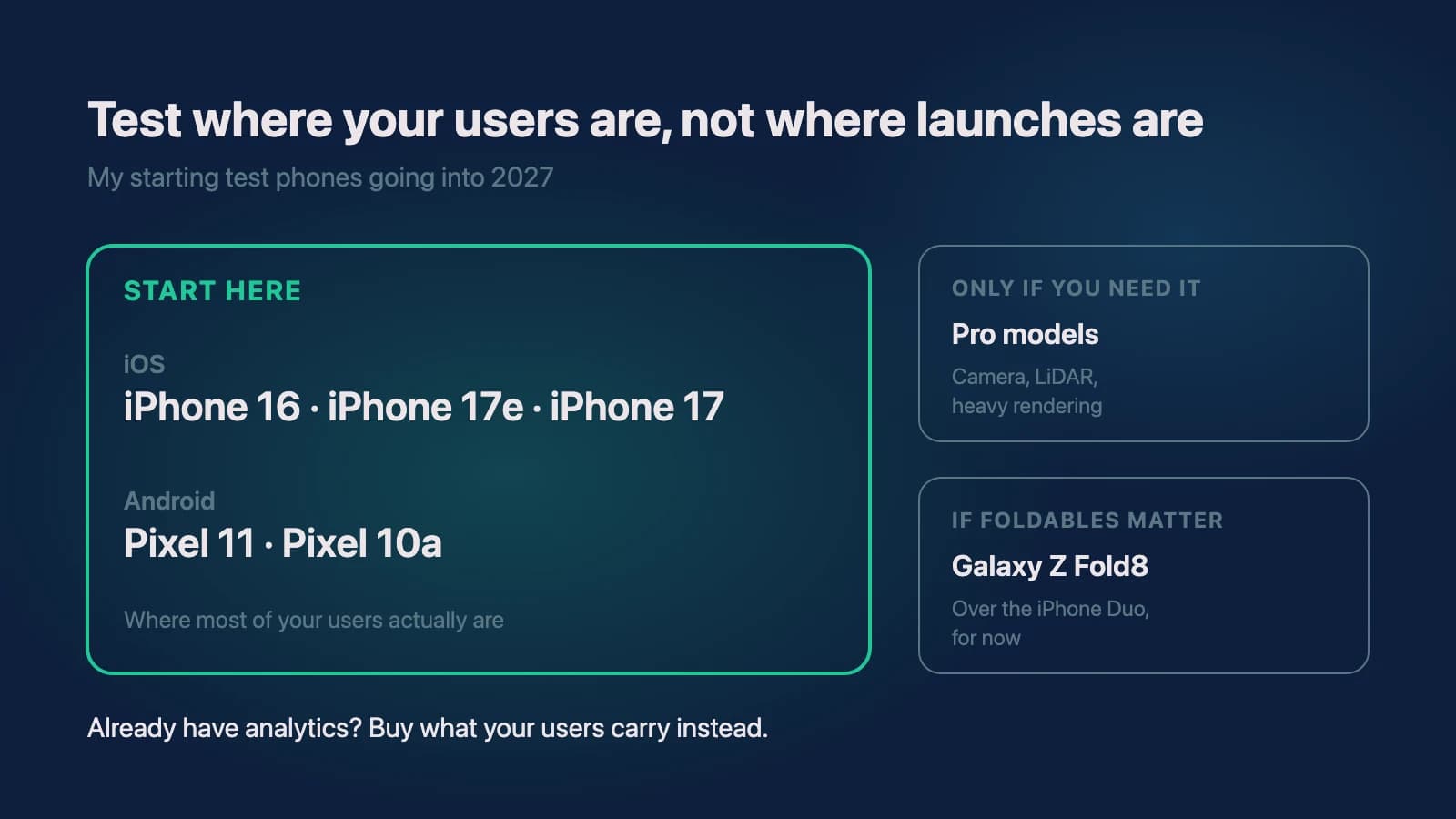
Here's the short answer. If you're starting a new app and don't know yet what your users carry, I'd test on an iPhone 16, iPhone 17e or iPhone 17 on the iOS side, and a Google Pixel 11 or Pixel 10a on the Android side. Skip the Pro models unless your app really leans on the camera, LiDAR or heavy processing. If foldables matter to you, I'd pick the Galaxy Z Fold8 over the iPhone Duo for now. And if you already have data on what your users are using, buy that instead and ignore everything I just said.
I've written before about why you don't need a new phone every year and about the full hardware a mobile team needs. This post is the specific list.
Two ecosystems, one of them simple
There's iOS and there's Android. iOS is easy to understand: it's owned by Apple and taken care of by Apple. Not a whole lot you need to know there.
Android gets a little tricky only in the sense that you're not just thinking about Google, who owns and operates Android. You're also thinking about Samsung, OnePlus, really any phone maker that isn't Apple. I'll come back to why that matters for testing.
Do you need the iPhone Duo?
The big thing everyone's talking about is the iPhone Duo. I'm going to tell you right here, right now: 90% of you probably don't need it, and if you do, you probably don't need it at launch.
Most people still just need a phone to call, text and do some quick stuff. Most people don't need a phone that's also a tablet.
Don't get me wrong, I'm a huge believer in foldables. I've been playing with them since Samsung announced the first Z Fold, and I think they're going to be a part of our future. I just don't see the iPhone Duo being mass adopted today. You'd be focusing on the top 1% of users, and while that 1% might actually be your target market, most teams aren't building for them first. (I went deeper on how to decide that in Is Your App Ready for Foldable Phones?)
Which iPhone should you test on?
For most people and most development, I'd recommend the iPhone 17, the iPhone 17e or the iPhone 16. As I write this, Apple still sells all three, starting at $899, $699 and $799 on Apple's iPhone store. The iPhone 18 Pro starts at $1,199 and the iPhone Duo at $1,999.
I don't even recommend the Pro models as often as I used to. I think they're amazing. They have some of the best cameras you can put in a phone, the processors do a lot of work, the nicer Siri AI features run faster, and rendering and gaming are great. The reason I don't recommend them as often is one reason only: most people don't need the Pro features. Most people take quick shots, if that, and they mostly use their phones for text messages and social media. If that's what a good chunk of your users are doing, you don't need the latest and greatest hardware to understand their experience.
There are very specific cases for a Pro. If your app is very processor heavy, does a lot of rendering, needs the LiDAR, or needs something extra from the Neural Engine, a Pro model is your best bet for seeing how the app really handles.
The other thing to remember is who's buying. People who want an iPhone usually aren't spending well over a thousand dollars on the newest Pro. In my experience a lot of people want to spend maybe $600, maybe $700 at most, and some will stretch it. That's exactly where the iPhone 16, 17e and 17 sit. Most people also wait years before they upgrade, so last year's phone won't hurt your testing compared to this year's. If you can get last generation's phone at a good discount, you're probably more than fine.
That's especially true on iOS because Apple keeps older phones updated for a long time. iOS 27 still supports the iPhone 11 and the second-generation iPhone SE. Someone on an iPhone SE 2 today is probably going to wait another year or two before buying anything. So unless you have a real reason for the Pro, an iPhone 17 or iPhone 16 is just as good for testing as an iPhone 18 Pro. Hands down.
Which Android phone should you test on?
Android is different because you have so many companies, so many prices, designs and styles, and different operating systems within the operating system.
When you talk to somebody on a Google Pixel, it's easy to know what they're running: Android, say Android 17. When you talk to somebody on a Samsung, it gets a little trickier. They're running Android, but they're also running One UI, Samsung's layer on top of Android.
I have nothing but positive things to say about One UI. It runs very well, it looks sleek and clean, and it looks really good on Samsung devices. I've been on iOS for the last eight years and used Samsung before that, and it's refreshing to see Samsung build something on top of Android that's as smooth and clean as what Apple has done with its Human Interface Guidelines. For the way a phone looks and feels, I definitely recommend Samsung.
For development, though, the best Android phone you can get today is the Google Pixel 11. The reason I keep going back to Pixels every single time is that I can use not only the latest version of Android but also any beta Google puts out. You don't get that with Samsung. That was one of my biggest gripes, and it's why I left Samsung and went back to a Pixel. Every time I wanted to try the newest Android feature or beta, or figure out whether an idea would help one of my apps, I had to finesse my Samsung to make it work. It became a lot easier to just keep a Pixel ready to develop on. Both let you develop on them and you can do a lot with both, but for testing, the Pixel wins.
For the price, I'd recommend the Pixel 11, and I'd even go down to the Pixel 10a, which is still available and which a lot of people are using these days. The Pixel 11 starts at $899, the Pixel 11 Pro at $1,099, and the Pixel 10a at $599 on the Google Store as I write this.
As cool as the Pro is, be honest about how you're developing. Are you really going to be using the camera? If you are, go for the Pro, and the same goes for iOS. But if your app doesn't use the camera, or only uses the front-facing one, there's no real reason to pay about $200 more for a camera bump.
Should you buy a foldable to test your app?
While I believe foldables are the future, I don't believe everyone should rush out to buy one to test their app. Most users aren't going to be on an iPhone Duo on day one. Samsung is on its eighth generation of the Z Fold and we still don't have mass-market adoption. It's gotten to the point where foldable owners are saying they've kind of given up on developers, because developers aren't really testing on them.
If you do want to test on a foldable today, between the iPhone Duo and the Galaxy Z Fold8, I'd say hands down the Z Fold8. People love the passport style and the way it opens up. I was tempted to buy one recently. I didn't, only because right as I went to buy it I saw that Apple was about to announce the iPhone Duo, and I bought that instead. But playing with the Z Fold8 really got me excited for what foldables are going to be able to do.
Samsung now makes two versions, and the difference is the whole trade-off. In Samsung's words, the Galaxy Z Fold8 is the wide foldable built for viewing and the Z Fold8 Ultra is the productivity-first one. I prefer the wider, shorter shape over the Ultra or the Pixel 11 Pro Fold. A lot of people worry the shorter design will be uncomfortable. I have larger hands and I can get across the whole keyboard with two hands a lot better. With one hand some things are hard, but I've noticed I end up typing texts and emails two-handed anyway. Maybe that's a bigger deal for people who do everything one-handed.
What really gets me excited is the inner display. Opened up, these look like tablets. You might still see some black bars, but they're nowhere near as big as they used to be. They actually feel like tablets for the first time.
Foldables are almost a catch-22. To make a good outer screen it has to look like a phone, and then you sacrifice the tablet, which is what you see with the Z Fold8 Ultra. To make a good tablet, you sacrifice the outer screen: it opens wider but it's shorter and doesn't feel as comfortable as a regular phone. There's no right or wrong answer. It's preference, and it's your users' preference that counts.
What if you already know what your users are using?
This is the part that doesn't get talked about enough. One thing I just can't understand is why so many companies buy devices that are "good enough" but never buy the devices their users actually use.
Back in 2022 I worked with a company whose customers were using some of those old Amazon Fire tablets, and they just weren't good. We got to the point where we were about to buy some to see how the app behaved. Then we looked at the data and found they were only about 1% of the Android user base. Why bother?
What we did find was that a lot of people were on older iPad Airs with A-series chips, an A14 or something like that if I remember right, and that made up almost 40% of users. Maybe 10% were on an M1 iPad that had come out about a year earlier, and nobody was on anything newer. On Android, nobody was on anything above a Samsung Galaxy Tab S7 or S8 Ultra class tablet. I'm going from memory on the exact models, but the lesson stuck: the devices worth buying were not the ones we assumed.
So if you know exactly what your users are using, use that instead. Whatever I say here becomes irrelevant. This list is for when you're starting something brand new and have no idea yet, or you're trying to decide what to start with for general testing. Your analytics already know which devices your users carry, and that's where I'd start on any app build before buying a single test phone.
So which phones do I recommend for 2027?
On iOS, the iPhone 16, iPhone 17e and iPhone 17. Most people will probably buy one of these. On Android, the Google Pixel 11 or the Pixel 10a. If foldables matter to your product, the Galaxy Z Fold8.
The chips in all of these are phenomenal, and you're not going to see any major slowdown. As long as your app works well on those devices, you're probably good for the majority of your users.
So why overspend? Especially if you're a startup or a small company trying to find budget for your developers' devices, save yourself some money and get phones that work well. I won't get into tablets today. I think they follow a very similar cycle, and we can talk about those another time.
You don't need the latest and greatest phone just because you can buy it. Get your team devices that are actually going to help, because those are the phones your users are most likely holding. These are my general thoughts and there are always exceptions, but I think this is more true than not.
Need help with your project?
Chris Martinez
Founder of CAM Software · Mobile engineer
Chris founded CAM Software in 2022. He leads embedded product engineering engagements for established companies with mobile-led products, inherited applications, and delivery challenges. His work spans product alignment, React Native and native mobile engineering, supporting web and backend systems, release reliability, and responsible AI delivery. He also operates software products owned and operated by CAM Software from Northwest Arkansas and works with teams nationwide.